 Apr 15, 2020·1 reply
 bbbbbbb
no
scroll down to the green bar
Oh ok now I see

- Apr 15, 2020·1 replyWxh778
Oh ok now I see

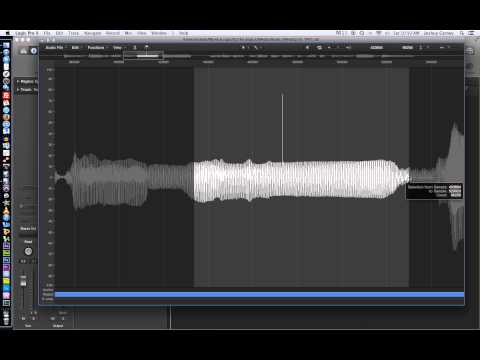
You can scroll through different points of the audio without changing the location of the region. This is useful for sampling so that you can get nice riffs without having to rechop the sample if you're working in audio
There's a lot of stuff you can do in the audio editor as well, check out youtube
- Apr 15, 2020·1 replybbbbbbb
You can scroll through different points of the audio without changing the location of the region. This is useful for sampling so that you can get nice riffs without having to rechop the sample if you're working in audio
There's a lot of stuff you can do in the audio editor as well, check out youtube

I never really used the audio editor view, i always just did it in main arrangement view. Didnt know Logic even had stuff like this

- Apr 15, 2020·1 reply
Pinging logic users to put everyone onto this
I really should have read the manual when I first got Logic
Always read your DAW and plugin manuals

- Apr 15, 2020Wxh778
I never really used the audio editor view, i always just did it in main arrangement view. Didnt know Logic even had stuff like this
It's frustrated me for a long time. Almost switched to Reaper specifically for the audio editing (still GOAT) but I love the stock Logic plugins.
Turns out I didn't know the program well enough

- Apr 15, 2020·1 reply
If you use the "speed" flex mode, it changes pitch
can be very neatI mainly use polyphonic and speed
The flex pitch function is great but I've never had a context where I needed to use it. Might be cool on a pad or something
- Apr 15, 2020
Also get good with Marquee tool
When I do individual slices hit ("t" - "i") real quick to switch to the scissor tool, then hit "t" - "t" to go back to the pointer tool
Logic workflow is a lot of hotkeys lol
 Apr 15, 2020·1 replybbbbbbb
If you use the "speed" flex mode, it changes pitch
can be very neatI mainly use polyphonic and speed
The flex pitch function is great but I've never had a context where I needed to use it. Might be cool on a pad or something
It changes the pitch of all regions at once? Thats kinda crazy lol
- Apr 15, 2020Moody mann
It changes the pitch of all regions at once? Thats kinda crazy lol
It can if everything is in one region
sometimes it sounds good on breaks
- Apr 15, 2020
logic users itt

 CARMEN 💜Apr 15, 2020·2 replies
either its the drums he's using or its Abelton, how this s*** sound so tight together? Not just the drums, but how they hit.
I don't use Abelton

- Apr 15, 2020!https://youtu.be/8QGZtla7tH8CARMEN
either its the drums he's using or its Abelton, how this s*** sound so tight together? Not just the drums, but how they hit.
I don't use Abelton
Ableton wins once again

Shlohmo a legend fr
- Apr 15, 2020·1 reply!https://youtu.be/8QGZtla7tH8CARMEN
either its the drums he's using or its Abelton, how this s*** sound so tight together? Not just the drums, but how they hit.
I don't use Abelton
sample selection
If you look at the kick, he took the tail off the sample
he probably shaped all of the hits in the sampler
If you're in EXS24 you can take the tails off by editing sample region. Doubleclick the sample inside of the "edit" window. Highlight the selection of the kick that u want without the tail. Then click on "convert selection to region"
- CARMEN 💜Apr 15, 2020·1 replybbbbbbb
sample selection
If you look at the kick, he took the tail off the sample
he probably shaped all of the hits in the sampler
If you're in EXS24 you can take the tails off by editing sample region. Doubleclick the sample inside of the "edit" window. Highlight the selection of the kick that u want without the tail. Then click on "convert selection to region"

some of his snares and percs in this are super tight
 Apr 15, 2020
 jesuisadorable
bpm too low tbh
i feel u tried speeding it up but just sounded off lmao
- Apr 15, 2020·2 replies
Best electronic producers are Nicolas jaar, sophie, opn

- CARMEN 💜Apr 15, 2020·1 reply
ngl this s*** boring, sounds like Thievery Corporation but twice as boring making house
 Apr 15, 2020ucantlickyourelbow
Nah this is f***ing fire
EDIT : Did you use alot of automation on the drums or just a glitch vst. The breakdown sounds really well arranged, how long did it take you to do?
Thanks g and nah it’s just a lot of weirdly placed and time stretched percussive elements mostly! Didn’t take too long
 Apr 15, 2020·1 reply
 LordPrettyFlackoJR
aye fam u from da US?

Yeah fam I’m from Virginia how about you?
- Apr 15, 2020!https://youtu.be/jySr7Nt2F-wCARMEN
some of his snares and percs in this are super tight
shape your samples
If you have a perc, shape the end of the audio to remove any kind of reverb tail.
- Apr 15, 2020·1 replyThrillerTrackTwo
Yeah fam I’m from Virginia how about you?
ayee well im from belgium
 that was going to be my question if u could hear it or understand evrything im saying?
cause ppl be saying the mixing sometimes mutters the words out - Apr 15, 2020CARMEN
ngl this s*** boring, sounds like Thievery Corporation but twice as boring making house
Nah man it puts you into outer space
- Apr 15, 2020the end
Best electronic producers are Nicolas jaar, sophie, opn
Too dissonant

