 Aug 8, 2021·5 replies
 ABYSSUS
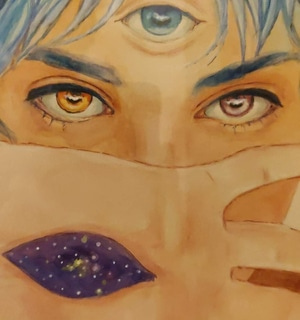
What program or site is this ?
VQGAN + Clip
There's a pretty easy tutorial on the first video result I think
S***'s pretty cool, you can imagine anything and it'll do the work for you

- ABYSSUS 💜Aug 8, 2021·1 replyHURRY UP HMFMM
VQGAN + Clip
There's a pretty easy tutorial on the first video result I think
S***'s pretty cool, you can imagine anything and it'll do the work for you
Thanks my man

I love autogenerated stuff. I often use it to come up with stuff outside of my comfort zone and then build something new from that. - Aug 8, 2021·1 replyABYSSUS
Thanks my man
I love autogenerated stuff. I often use it to come up with stuff outside of my comfort zone and then build something new from that.You should check out jukebox colab as well. It's basically an ai singing the song using the vocals of another artist with the lyrics you write. It can also do a lot more things but I'm too lazy to explain haha
Here's it trying to sing as Michael Jackson on I feel it coming:

It's not perfect but you can sometimes hear MJ on this
- ABYSSUS 💜Aug 8, 2021·1 replyHURRY UP HMFMM
You should check out jukebox colab as well. It's basically an ai singing the song using the vocals of another artist with the lyrics you write. It can also do a lot more things but I'm too lazy to explain haha
Here's it trying to sing as Michael Jackson on I feel it coming:
!https://youtu.be/UW9iJsNqm24It's not perfect but you can sometimes hear MJ on this
I know about this one, there is some amazing ones in between. Crazy how far AI has got!
- Aug 8, 2021ABYSSUS
I know about this one, there is some amazing ones in between. Crazy how far AI has got!
This is just the beginning
- ABYSSUS 💜Aug 8, 2021·2 replies
Forgive me, for I too have synthed

 Aug 8, 2021
 BGFX
BGFXJust a heads up, if you are making a tweet using Take My Breath, don’t.
I just got my account suspended because of a copyright claim.
it always been like this. lot of acc get suspended due to copyrights. but i think u can get your acc back but lot of sh!t to do
 Aug 8, 2021·1 replyBGFX
Just a heads up, if you are making a tweet using Take My Breath, don’t.
I just got my account suspended because of a copyright claim.
Lmaoooo. Hate labels who copyright everything tbh, at the end of the day its just more exposure for your artist.
 Aug 8, 2021HURRY UP HMFMM
VQGAN + Clip
There's a pretty easy tutorial on the first video result I think
S***'s pretty cool, you can imagine anything and it'll do the work for you
I found the tutorial but it isn't working for me, don't know why. Could you make an image for me? I'll send u the text
- Aug 8, 2021SerbianoMatico
Lmaoooo. Hate labels who copyright everything tbh, at the end of the day its just more exposure for your artist.
yeah, it's not like i'm profiting from it either
just was making a fan edit
- Aug 8, 2021·1 replyHURRY UP HMFMM
VQGAN + Clip
There's a pretty easy tutorial on the first video result I think
S***'s pretty cool, you can imagine anything and it'll do the work for you
Link to tutorial?
- Aug 8, 2021HURRY UP HMFMM
VQGAN + Clip
There's a pretty easy tutorial on the first video result I think
S***'s pretty cool, you can imagine anything and it'll do the work for you
can you try something the dawn related?
 Aug 8, 2021
 RE1GN
RE1GNAnd make it last forever babe
Do it now or never babe
- Aug 8, 2021·2 repliesFlyMx
Link to tutorial?
Here's the link:
sourceful.us/doc/935/introduction-to-vqganclipYou'll need a Google drive for this as all of the files will be saved there. You can use a fake GDrive account if you don't want to use your main one btw.
After signing in to your GDrive, open the second link mentioned in the webpage I just linked you with.
After opening it;Press the play button next to "Google drive integration"
Wait til it prompts you to follow a link which would redirect you to login to the GDrive account which you'll use for this (again)
It'll give a code so copy that and paste it in the textbox shown in the Google colab page
Hit enter and wait for it to complete the integrationNow play the second step and the third step. The third step may take a while since it's grabbing all of the ai related stuff onto your drive. After it's done installing, you may find some text in red with a button "restart runtime". Press that button to restart the runtime.
On the fourth step before you hit play, make sure to only check "imgnet_16384" and leave the rest in that section unchecked. Then play that step
Then play the Loading and libraries
Then under implementation tools > parameters:
Prompts: this is where you type what your image wants to be.
Eg: The Weeknd | Dancing | Club
Which means that you want the picture to have the Weeknd, dancing at the club. The " | " is to separate each object from one another. You can also add "rendered using unreal engine" ( after adding a | to the prompt ofc) for some cool and weird 3D redentions of your artwork
Also, at the model part, select: vqgan_imagenet_f16_16348
Leave the rest untouched
Then press play on the parameters button
After that, press play on the execution button
The image will get iterated for infinite amounts of times with each iteration getting better and better (sometimes it gets worse). If you find a great iteration (or you like how that image looks like), just save that picture as how you would save a usual picture. That's it
You'll have to run it all again if you close the tab so

- Aug 8, 2021·1 replyABYSSUS
Forgive me, for I too have synthed
https://media.discordapp.net/attachments/869513272611725335/873909447599226930/VID_71531110_221804_938.mp4 - Aug 8, 2021·edited·3 repliesHURRY UP HMFMM

holy s*** ai has come a long way
i just wrote "the weeknd face by van gogh" on the prompt and this is the result

Performing at a club in hell, dancing in the fire

I forgot what I typed in for this


Weeknd face closeup rendered using unreal engine
- Aug 8, 2021HURRY UP HMFMM· edited
Performing at a club in hell, dancing in the fire
I forgot what I typed in for this
Weeknd face closeup rendered using unreal engine
that first one
- CKL TML 🌺Aug 8, 2021HURRY UP HMFMM· edited
Performing at a club in hell, dancing in the fire
I forgot what I typed in for this
Weeknd face closeup rendered using unreal engine
Omg.the first one is sooo fire
- CKL TML 🌺Aug 8, 2021
First one would be the goat abel cover
 Aug 8, 2021·1 replyHURRY UP HMFMM
Here's the link:
https://sourceful.us/doc/935/introduction-to-vqganclipYou'll need a Google drive for this as all of the files will be saved there. You can use a fake GDrive account if you don't want to use your main one btw.
After signing in to your GDrive, open the second link mentioned in the webpage I just linked you with.
After opening it;Press the play button next to "Google drive integration"
Wait til it prompts you to follow a link which would redirect you to login to the GDrive account which you'll use for this (again)
It'll give a code so copy that and paste it in the textbox shown in the Google colab page
Hit enter and wait for it to complete the integrationNow play the second step and the third step. The third step may take a while since it's grabbing all of the ai related stuff onto your drive. After it's done installing, you may find some text in red with a button "restart runtime". Press that button to restart the runtime.
On the fourth step before you hit play, make sure to only check "imgnet_16384" and leave the rest in that section unchecked. Then play that step
Then play the Loading and libraries
Then under implementation tools > parameters:
Prompts: this is where you type what your image wants to be.
Eg: The Weeknd | Dancing | Club
Which means that you want the picture to have the Weeknd, dancing at the club. The " | " is to separate each object from one another. You can also add "rendered using unreal engine" ( after adding a | to the prompt ofc) for some cool and weird 3D redentions of your artwork
Also, at the model part, select: vqgan_imagenet_f16_16348
Leave the rest untouched
Then press play on the parameters button
After that, press play on the execution button
The image will get iterated for infinite amounts of times with each iteration getting better and better (sometimes it gets worse). If you find a great iteration (or you like how that image looks like), just save that picture as how you would save a usual picture. That's it
You'll have to run it all again if you close the tab so
Oh come on. I thought this was an app where you just type whatever and it brings out the image

- ABYSSUS 💜Aug 8, 2021https://twitter.com/0PN/status/1424233619862687751CyberPunk
Thanks Fam, The Dawn hype got to me while producing

- Aug 8, 2021·1 replyO7OXO
Oh come on. I thought this was an app where you just type whatever and it brings out the image
Wish it was that easy

- Aug 8, 2021·1 replyHURRY UP HMFMM
Wish it was that easy
How did you even find out about it
- Aug 8, 2021O7OXO
How did you even find out about it
YouTube recommendations lmao